2 minutes
Download Google Drive Files with CURL and WGET (2020)
I need to mirror some Public Google Drive Files to my server, since i got slow connection, sometimes the files which I tried to download can’t get resumed if something happened during the process,
It was real pain to re-download it from the beginning, what a mood-breaking moment.
One of the solution was to keep the files somewhere where you can access and direct download it with full speed, I’ve been googling for a while, and i couldn’t found a way which ‘still’ works.
So I tried to hack it myself with my way
Here’s what I’ve done to download Google Drive Files to my server:
Go to the link of file you want to download and Inspect Element,
Click “DOWLOAD ANYWAY” button while you’re on the Network Tab of Inspect Window
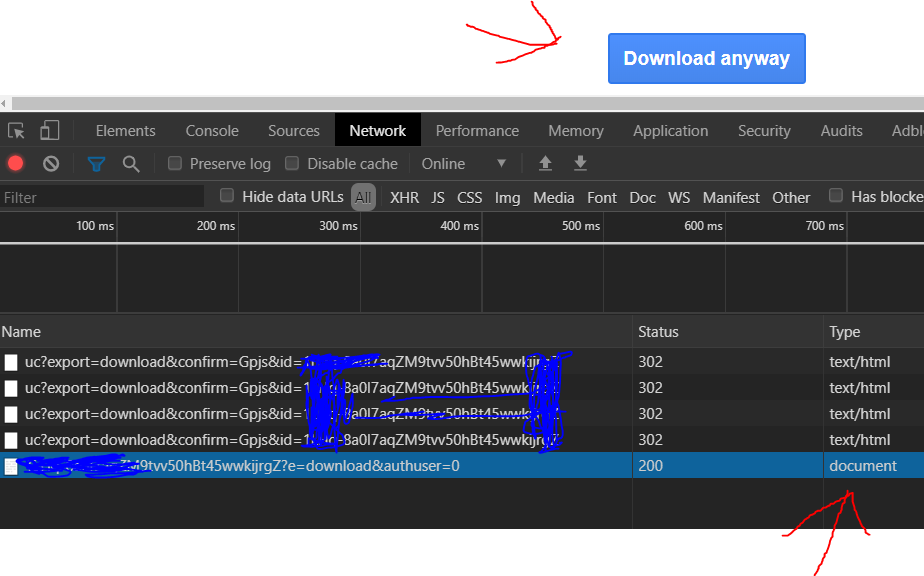
There are few request on server made by the click you triggered, find the one where the “Content-Type” header match the file you tried to download, as example ("Application/binary") ("Application/x-rar”)

After you found the right Link Server Request which has the right Content/MIME type as your file,
for UNIX:
Right-click > Copy > Copy all as curl (bash)for Windows:
Right-click > Copy > Copy all as curl (cmd)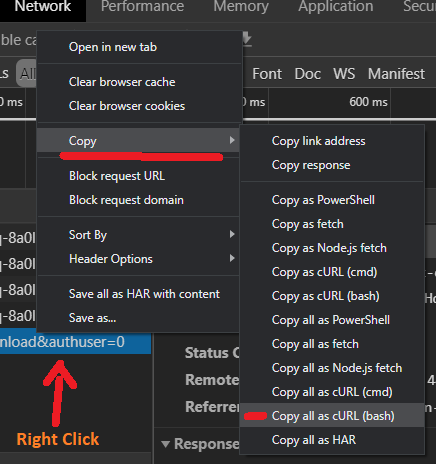
In your (Unix) server, type paste the copied curl to a file, with
~$nano gdrive
or paste into terminal:
~$"paste here" > gdrive(this will relocate the content you paste to a file)
after the copy pasted command was there on the file, type
~$ sh ./gdrive > [filename.ext],this will write the buffered stream to a file name and extension of your choice.
So in example if I want to download test.rar, then i would do ~$ sh ./pastedcurl > test.rar,
It works because the file requested by the Google Drive Server has the Çontent-Type/MIME of source file, all we need is to stream those buffered request into a file.
Well that’s all how i manage to Mirror Google Drive File to UNIX Server with WGET / CURL, after awhile seeking a known method which turns out, nothing is work but this. Hope it’s helpful.